basics of css
what is css?
css is know as a cascading style sheet it can help to make our html beautiful ,responsive .
html id and class attributes
when we can given a id to select that element then it can given a class we can also select using a id attributes also but we can also have a one more things to understanding if a one element have a multiple class but we can not a a multiple id for it
ways to add a css to html
there are a 3 ways to add css
1 use a style tag inside a html tag with using a style tag
2 inline css we can simple use it to create a head tag our head tag for using style tag
3 external css we can use it to create a external file like (.css )after that we can add it using link tag
Types of selectors in css:
body selector:
body{
background:pink;
color:red;
}
element selector:- it can we used to select a element by using a tag names
h2{
color:blue;
};
id selector:→ it is used to select a element with a given id
# me{
color: white;
background:black;
}
class selector:→ it is used to select a element by given by a class name
.red{
background:red;
}
important points
we can group a selectors like this h1,h2,h3,h4 div{ color:blue}
we can also have a one universal selectors to select all of element *{margin:0 ,padding:0}
colors and background
font color
p{ color:red} it can change a font color to a black to red
background color
.me{background-color : purple;}
background image
body{ background-image: url(“deep.jpg“);
for add more about background and colors follow this
box models in css
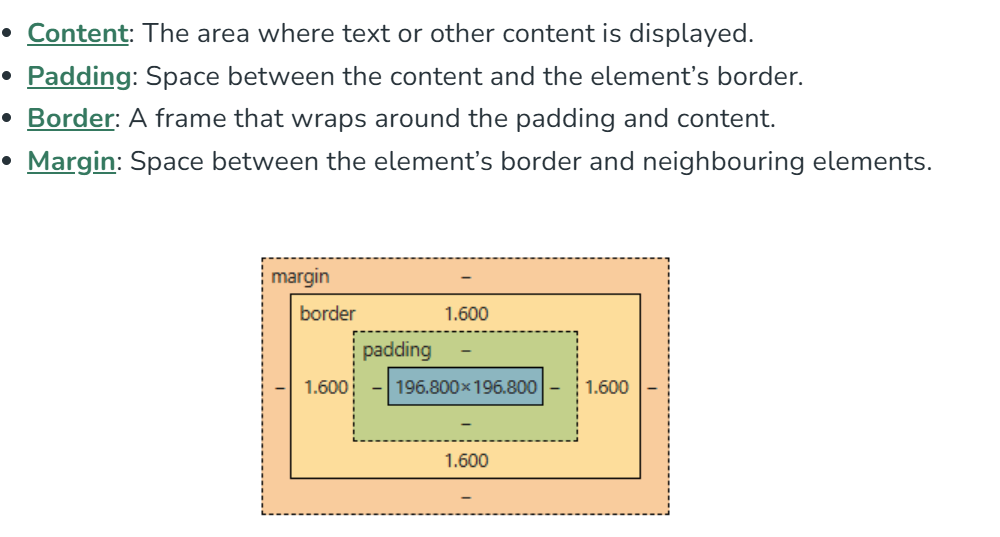
how we set a height and width in a css
#box{
height:70px;
width:150px;
}
important point :- total height =height+widht+left padding+right padding+top+bottom
how we set a margin and padding?
.box{
margin: 3 px;
padding:4 px;
}
apply margin from a all of direction shorthand
.boxmain{margin: 5px 6px 7px 9px } it is from a top right bottom left
Setting Borders
.bx{ border-width:4px;border-style:solid; border-color red'; border-radius:9px;}
Font and display essentail in css
The display property specifies the display behavior (the type of rendering box) of an element.
display inline → it can takes only that space required by the element. it can display no like breaks between elements.
display block→ it can takes a full block space available in width and leaves a new line always.
display inline block→ it is a mixture of both display inline and block
display none→ it can use to not show a display of that tag to our screen
all essentail font property of text and font
font-family: 'Arial', sans-serif;
font-size: 16px;
font-weight: bold;
text-align: center;
text-decoration: underline;
text-transform: uppercase;
line-height: 1.5;
letter-spacing: 2px;
color: #333333;
text-shadow: 2px 2px 4px #000000;
z index:
simply iskaa kaam hai yei pta krna ki konsa element upar ayega aur konsa niche
agar z index ki value negative hai tau niche aur agar positive hai tau fir upar ayeagea simple
example
flex box
it is used to arrange a items in a form of a containers makings it a flexible and a containors
how we can apply flex box:
step 1: first we can make a two div tag one is parent and one is a child
step2: second we can make a parent display as a flex of a parent
step 3: select a direction of which you want row wise and coloum wise
all edition property :
.parent{
justify-content:space betweem
}
.parents{
align-items:center;
}
